From PDFs to Knowledge with Embeddings on AWS
How to build a knowledge base over PDFs using Amazon Bedrock Knowledge Bases and S3 Vectors.
In this post, we’ll walk through how to build a searchable knowledge base over your PDFs using Amazon Bedrock Knowledge Bases and S3 Vectors as AWS’s native vector store.
What is S3 Vectors?#
S3 Vectors is a new Amazon S3 capability that allows you to store and query vector embeddings directly in S3. This significantly simplifies the architecture of RAG (Retrieval-Augmented Generation) applications by eliminating the need for separate vector database services.
Benefits of using S3 Vectors#
- Cost reduction for RAG applications with large vector datasets.
- Native integration with Amazon Bedrock Knowledge Bases.
- Automatic vector management handled by the Amazon Bedrock service.
- Sub-second cold query latency and as low as 100ms warm query latency.
- Durability and scalability inherent to Amazon S3.
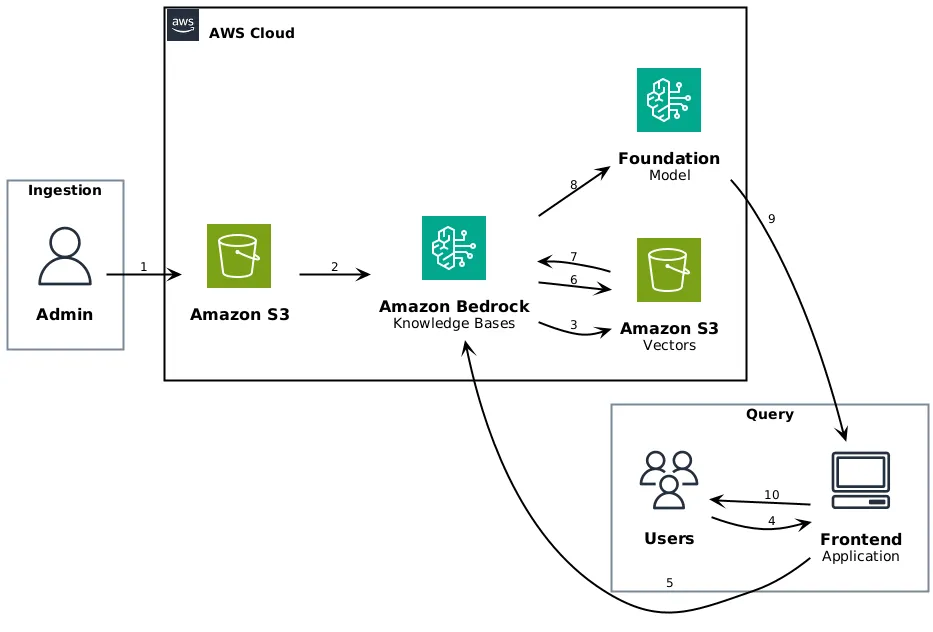
Overall Architecture#
@startuml
!define AWSPuml https://raw.githubusercontent.com/awslabs/aws-icons-for-plantuml/v19.0/dist
!include AWSPuml/AWSCommon.puml
!include AWSPuml/AWSSimplified.puml
!include AWSPuml/General/User.puml
!include AWSPuml/General/Users.puml
!include AWSPuml/General/Client.puml
!include AWSPuml/Storage/SimpleStorageService.puml
!include AWSPuml/ArtificialIntelligence/Bedrock.puml
!include AWSPuml/Groups/AWSCloud.puml

left to right direction

rectangle "Ingestion" {
User(admin, "Admin", "")
}

rectangle "Query" {
Users(users, "Users", "")
Client(app, "Frontend\nApplication", "")
}

AWSCloudGroup(cloud) {
SimpleStorageService(s3, "Amazon S3", "Documents")
Bedrock(kb, "Amazon Bedrock\nKnowledge Bases", "")
SimpleStorageService(s3v, "Amazon S3\nVectors", "")
Bedrock(fm, "Foundation\nModel", "")
}

admin --> s3 : 1
s3 --> kb : 2
kb --> s3v : 3

users --> app : 4
app --> kb : 5
kb --> s3v : 6
s3v --> kb : 7
kb --> fm : 8
fm --> app : 9
app --> users : 10
@enduml
Ingestion (Admin):
- Admin uploads documents to S3
- Knowledge Bases ingests and chunks documents
- Embeddings are stored in S3 Vectors
Query (Users):
- User sends a query through the frontend application
- Application calls Knowledge Bases API
- Knowledge Bases searches S3 Vectors
- Relevant chunks are retrieved
- Context is sent to the Foundation Model
- Generated response is returned to the application
- Application displays the response to the user
Unlike traditional architectures where you must manually manage text extraction, chunking, and embedding storage, Amazon Bedrock Knowledge Bases automates the entire RAG workflow when using S3 Vectors.
When to Use This Integration#
Consider using S3 Vectors with Amazon Bedrock Knowledge Bases when you need:
- Cost-effective vector storage for large datasets where sub-second query latency meets your requirements.
- Text and image-based document retrieval for use cases like searching through manuals, policies, and visual content.
- RAG applications that prioritize storage cost optimization over ultra-low latency responses.
- Managed vector operations without needing to learn S3 Vectors APIs directly.
- Long-term vector storage with the durability and scalability of Amazon S3.
Step 1: Prepare Documents in S3#
The first step is to have all your documents centralized in an S3 bucket that will act as the data source.
Best practices:
- Use a dedicated bucket, for example:
my-knowledge-base-documents. - Structure by logical folders:
contracts/,manuals/,policies/. - Supported formats: PDF, TXT, MD, HTML, DOC/DOCX, and more.
- Configure IAM policies and encryption (SSE-S3 or SSE-KMS) based on sensitivity.
s3://my-knowledge-base-documents/
  contracts/
    contract-123.pdf
    contract-456.pdf
  manuals/
    product-a-manual.pdf
  policies/
security-policy-v1.pdfStep 2: Create the Knowledge Base with S3 Vectors#
You can create a Knowledge Base that uses S3 Vectors in two ways:
Option A: Quick Create (recommended)#
From the Amazon Bedrock console:
- Go to Knowledge Bases > Create knowledge base.
- Connect your S3 bucket as the data source.
- Select S3 vector bucket as your vector store.
- Choose Quick create a new vector store.
Amazon Bedrock will automatically create:
- An S3 vector bucket to store the embeddings.
- A vector index configured with the required settings.
- Default encryption with SSE-S3 (optionally SSE-KMS).
Option B: Use an Existing Vector Store#
If you already have an S3 vector bucket and vector index created:
- Select Choose a vector store you have created.
- Choose the bucket and index from your account.
Step 3: Configure the Embedding Model#
Amazon Bedrock Knowledge Bases supports several embedding models. Some examples:
| Model | Dimensions | Use Case |
|---|---|---|
amazon.titan-embed-text-v2 | 1024 | General text |
amazon.titan-embed-image-v1 | 1024 | Text + images |
cohere.embed-english-v3 | 1024 | English optimized |
cohere.embed-multilingual-v3 | 1024 | Multilingual |
The model is configured when creating the Knowledge Base and determines how embeddings are generated from your documents.
Step 4: Sync the Data#
Once the Knowledge Base is created, you need to sync the documents:
- Go to your Knowledge Base in the console.
- Select the data source (your S3 bucket).
- Click Sync to start ingestion.
During synchronization, Amazon Bedrock:
- Scans each document and checks if it’s already indexed.
- Extracts text from the documents.
- Splits the content into chunks.
- Generates embeddings using the configured model.
- Stores the vectors in the S3 vector bucket.
You can also index documents directly using the IngestKnowledgeBaseDocuments API.
Step 5: Query the Knowledge Base#
There are two ways to query the Knowledge Base:
sequenceDiagram
  participant U as User
  participant App as Application
  participant KB as Knowledge Base
  participant S3V as S3 Vectors
  participant LLM as Bedrock LLM

U->>App: Natural language question
App->>KB: RetrieveAndGenerate API
KB->>S3V: Vector search
S3V-->>KB: Relevant chunks
KB->>LLM: Prompt + context
LLM-->>KB: Generated response
KB-->>App: Response with citations
App-->>U: Final response
sequenceDiagram
  participant U as User
  participant App as Application
  participant KB as Knowledge Base
  participant S3V as S3 Vectors

U->>App: Natural language question
App->>KB: Retrieve API
KB->>S3V: Vector search
S3V-->>KB: Relevant chunks
KB-->>App: Chunks + metadata + score
App->>App: Custom processing
App-->>U: Custom result
Retrieve API#
Retrieves relevant chunks without generating a response:
import { BedrockAgentRuntimeClient, RetrieveCommand } from '@aws-sdk/client-bedrock-agent-runtime'

const client = new BedrockAgentRuntimeClient({ region: 'us-east-1' })

const response = await client.send(
  new RetrieveCommand({
    knowledgeBaseId: 'YOUR_KB_ID',
    retrievalQuery: {
      text: 'What are the payment terms in the contract?'
    },
    retrievalConfiguration: {
      vectorSearchConfiguration: {
        numberOfResults: 5
      }
    }
  })
)

// response.retrievalResults contains the relevant chunks
for (const result of response.retrievalResults ?? []) {
  console.log('Content:', result.content?.text)
  console.log('Score:', result.score)
  console.log('Location:', result.location?.s3Location?.uri)
}RetrieveAndGenerate API#
Retrieves chunks and generates a response using an LLM:
import {
  BedrockAgentRuntimeClient,
  RetrieveAndGenerateCommand
} from '@aws-sdk/client-bedrock-agent-runtime'

const client = new BedrockAgentRuntimeClient({ region: 'us-east-1' })

const response = await client.send(
  new RetrieveAndGenerateCommand({
    input: {
      text: 'What are the payment terms in the contract?'
    },
    retrieveAndGenerateConfiguration: {
      type: 'KNOWLEDGE_BASE',
      knowledgeBaseConfiguration: {
        knowledgeBaseId: 'YOUR_KB_ID',
        modelArn:
          'arn:aws:bedrock:us-east-1::foundation-model/anthropic.claude-3-sonnet-20240229-v1:0'
      }
    }
  })
)

// Generated response
console.log('Response:', response.output?.text)

// Citations to source documents
for (const citation of response.citations ?? []) {
  for (const ref of citation.retrievedReferences ?? []) {
    console.log('Source:', ref.location?.s3Location?.uri)
    console.log('Fragment:', ref.content?.text)
  }
}Required IAM Permissions#
The Amazon Bedrock service role needs permissions to:
- Access the S3 bucket with the source documents.
- Create and manage the S3 vector bucket.
- Invoke embedding models and LLMs.
Example policy for the vector bucket:
{
  "Version": "2012-10-17",
  "Statement": [
    {
      "Effect": "Allow",
      "Action": ["s3:GetObject", "s3:PutObject", "s3:DeleteObject", "s3:ListBucket"],
      "Resource": ["arn:aws:s3:::my-vector-bucket", "arn:aws:s3:::my-vector-bucket/*"]
    },
    {
      "Effect": "Allow",
      "Action": [
        "s3vectors:CreateIndex",
        "s3vectors:DeleteIndex",
        "s3vectors:GetIndex",
        "s3vectors:ListIndexes",
        "s3vectors:PutVectors",
        "s3vectors:GetVectors",
        "s3vectors:DeleteVectors",
        "s3vectors:QueryVectors"
      ],
      "Resource": "*"
    }
  ]
}Summary#
- S3 stores your source documents (PDFs, etc.).
- Amazon Bedrock Knowledge Bases automates ingestion, chunking, and embedding generation.
- S3 Vectors acts as a native vector store, eliminating the need for separate vector databases.
- The Retrieve and RetrieveAndGenerate APIs allow you to query your knowledge base.
- Responses include citations to source documents.
This architecture allows you to build RAG applications simply and cost-effectively, leveraging native integration between AWS services.